Changelog
What's new.
Every release of Copper, newest first.
Version 1.2.6
Latest
Full-width sheets on a folded iPhone Duo
Folded, the screens that slide up on iPhone Duo now use the whole width of the phone. And the Copper C comes to life as the app opens.
- ImprovedOn a folded iPhone Duo, editors, pickers and other sheets now cover the whole screen, side bar included, instead of squeezing in beside it. Unfolded, they still sit beside the bar.
- NewWhen Copper opens, the C in its logo steps apart and snaps back together as the coin drops into its slot, then fades into the app.
Version 1.2.5
A better balance on iPhone Duo
Unfolded, the panel beside your lists has a little more room again, so its details are easier to read.
- ImprovedOn an unfolded iPhone Duo, Transactions and Buckets now give their list about 60% of the screen and the details panel beside it 40%, instead of 70/30. The Left-to-Spend card on the Dashboard and its math beside it share the screen the same way.
Version 1.2.4
More room for your lists on iPhone Duo
Unfolded, your transactions, buckets and Left-to-Spend now take most of the screen, with the panel beside them narrower.
- ImprovedOn an unfolded iPhone Duo, Transactions and Buckets give their list about 70% of the screen instead of half, with the details panel beside it. On the Dashboard, the Left-to-Spend card gets the same share, with its math beside it.
Version 1.2.3
Room for Live Activities on iPhone Duo
On iPhone Duo, your budget's picture and the tabs now sit toward the bottom of the side bar, so they never end up under the time or a Live Activity.
- FixedOn iPhone Duo, a Live Activity in the side bar pushed the time down over your budget's picture. The picture, tabs and Penny now stand together toward the bottom of the bar.
Version 1.2.2
Fills the iPhone Duo
Copper now opens full screen on iPhone Duo, with its tabs in the side bar and room for two columns when it's unfolded.
- FixedOn iPhone Duo, Copper opened in a smaller window with black borders instead of filling the screen. It now fills both the inner and outer screens.
Version 1.2.1
Refresh a bank now
On Plus, you no longer have to wait for your bank's next check. Tap Refresh now and Copper asks it for new transactions right away.
- NewRefresh now, on Plus: open a bank in Connected Accounts and have it checked for new transactions right away. Plus includes 5 refreshes a month, and they come back each time your plan renews.
- NewLifetime Plus plans can refresh as often as they like.
- NewOn the web, Refresh now is in each bank's menu under Banks & accounts.
- FixedA message shown while a sheet was open, like a bank that couldn't refresh, never appeared and left the app unresponsive. It now shows on top of the sheet.
Version 1.2.0
Copper for Android
Copper now runs on Android phones too, with the same buckets, Left-to-Spend, bills, Trends and Penny as on iPhone, and your budget stays in sync between them.
- NewCopper for Android. Sign in with the same account and everything is there: your budgets, buckets, bills, transactions and shared budgets.
- NewLeft-to-Spend and Bucket widgets for your Android home screen.
- NewOn Android, subscriptions are billed through Google Play, and you can unlock Copper with your fingerprint or face.
- ImprovedInvite links and links in Copper's emails open the app on Android as well as iPhone.
Version 1.1.2
Find your bills, fixed
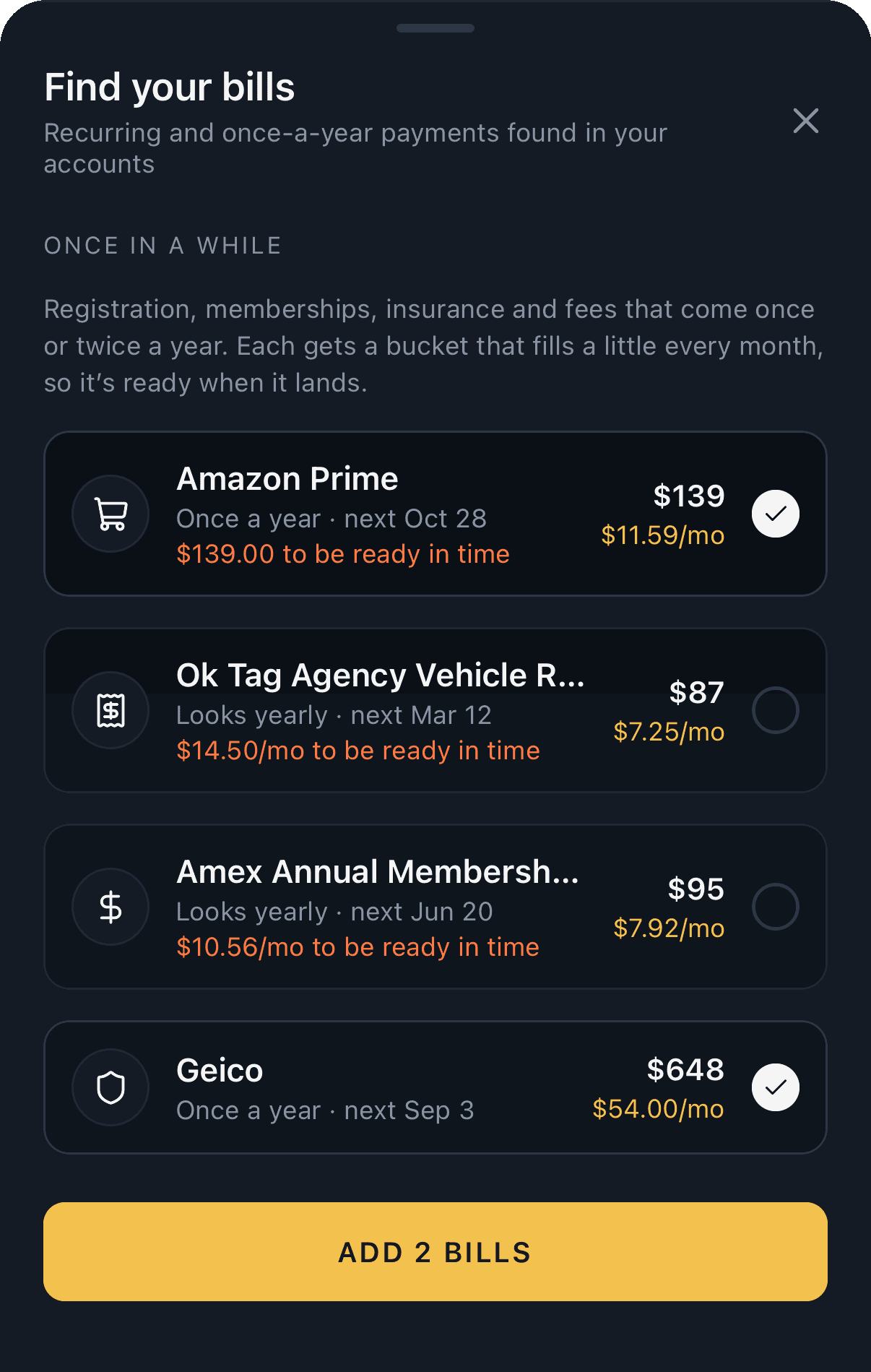
Adding the bills Copper finds in your bank works on your iPhone again, and each bill remembers the account it's paid from.
- FixedAdding bills from Find bills from your bank on Buckets could freeze the app, and the bills weren't added. They're now added in one go.
- FixedBills found while setting up Copper are added too, with the account they're paid from, so low-balance warnings can watch them.
- ImprovedIf bills can't be added, Find your bills stays open with the reason, so you can try again.
Version 1.1.1
Stay signed in
Copper keeps you signed in on your iPhone. Signing out somewhere else, or entering a two-step code on the web, no longer signs you out on your phone.
- FixedCopper could sign you out of your iPhone after you entered a two-step verification code on the web. Your phone now stays signed in.
- ImprovedSigning out on your iPhone or the web signs out only that device. Your other devices stay signed in. To sign out everywhere, change your password.
- ImprovedTransaction details no longer list Ask Penny questions under Notes. You can still ask Penny about any store from Trends.
Version 1.1.0
Penny lends a hand
Penny can now move money, fund buckets, make rules and pause buckets for you, and answer what-ifs. Copper warns you before a bill hits an account that can't cover it, helps you build an emergency fund, sends a recap of each month, and comes to iPad.
- NewAsk Penny to “move $50 from Fun to Groceries”, “put $100 in Vacation”, “always put Starbucks in Coffee” or “pause Gym until January”. She shows what she'll do first, and nothing changes until you tap Confirm.
- NewWhat-ifs: ask “what if I cancel Netflix and Hulu?” to see what you'd save, or “if I put $200 a month into Vacation, when will I get there?” for a date.
- NewAsk Penny about any purchase from its details: how often you go there, how much this year, or whether it's more than usual.
- NewLow-balance warnings: two days before a bill or card payment comes out of an account that won't have enough, Copper tells you. It learns which account pays each bill from your bank.
- NewBuild an emergency fund from the Goals filter: Copper suggests six months of your bills and spending, and you pick the amount and the date to have it by.
- NewNo spending buckets yet? The Spending filter suggests them from your last 90 days, groceries, gas, eating out and more, each sized to a month.
- NewPause a bucket's funding until a date, for a closed gym or a summer without trips. For a bill, it's right on the bill's sheet. Its money stays put.
- NewA monthly recap on the 1st, and at the top of Trends for the first week: what you spent against the month before, money in and out, and where most of it went.
- NewUndo, for a few seconds after you change a transaction, fund a bucket or delete one.
- NewSearch transactions by amount or time: “42.10”, “starbucks march”, “last week”.
- NewA Bucket widget for your Home and Lock Screens, Siri answers “how much is left in Copper?”, and your buckets show up in iPhone search.
- NewCopper on iPad, with the tabs down the side and your list and details side by side.
- NewImport your history from YNAB, Monarch, Copilot or Mint in Settings, so Trends and Penny reach back further.
- NewInvite friends from Settings: get a free month for each friend who joins and subscribes.
- ImprovedWhen a bank itself is down, Copper says so, with nothing for you to do, instead of asking you to reconnect.
- ImprovedLarger text sizes fit better across the app.
- ImprovedFaster all round: switching tabs no longer reloads your transactions, scrolling stays smooth, Penny's answers stream in without stutter, and a bank sync updates your buckets in one go.
Version 1.0.14
Names that stick
Always names now follow a payee even when the bank adds a reference number, a store number or a date. Name one Wave payout and every payout after it gets the same name.
- ImprovedAlways for a name matches every transaction that starts the same way, so “WAVE PAYOUT REF 8X7Y2” and “WAVE PAYOUT REF 9QK41” are one payee. Reference and confirmation numbers, store numbers, phone numbers, dates and prefixes like “SQ *” or “POS DEBIT” are ignored. Account numbers count, so transfers to different accounts keep their own names.
- ImprovedPast transactions your rules missed before get their names, unless you named them yourself, and a pending charge that posts under a new description picks up its rule's name.
- ImprovedWhen two rules match, the more specific one wins: “Wave Payout” beats “Wave”.
Version 1.0.13
Apple Pay setup for iOS 27
Shortcuts changed in iOS 27, so the Apple Pay Sync walkthrough is now a recording of the new Shortcuts app itself, with every tap shown. And tapping the tab you're already on takes you back to the top.
- ImprovedPersonal Details no longer asks for your location, and Copper forgets one you saved when you next save your details.
- ImprovedTap the tab you're already on to jump back to the top of the page. On the web, clicking the menu item for the page you're on does the same.
- FixedOn iOS 27, Show Me in Shortcuts plays a new video and lists new steps: tap +, then Edit, tap Automation and search Wallet to add the Wallet automation, add Copper's Log Apple Pay Purchase, and fill in Amount, Merchant and Card from the transaction. iOS 26 and earlier keep the old steps.
Version 1.0.12
Bills you can spot
Upcoming bills on your Dashboard now show each bill's bucket icon, so you can tell rent from your phone bill at a glance. On a shared budget, you can now see the accounts your partner counts in it, and invite codes are longer and harder to guess.
- ImprovedEach bill in Upcoming bills on the Dashboard shows its bucket's icon in place of a plain dot. Overdue and due-soon bills still light up in their warning color.
- NewOn a shared budget, Accounts shows the accounts other people count in it, under Linked by and their name, with each account's balance. Only they can change their banks, and their other banks stay private.
- ImprovedBudget invite codes are now 10 characters, like K7QP4-XNMR2, so they're much harder to guess.
- ImprovedRemoving someone from your budget opens a sheet that shows the accounts leaving with them and their balances, and what else changes, before you confirm.
- NewA budget's picture can be a website's icon: in Budget Settings, choose Website, paste a link like costco.com and tap Get icon. Copper saves the icon with the budget, on iPhone and the web.
- NewTap a transaction's picture to swap the merchant logo for an icon, an emoji or a website's icon. Use merchant logo puts it back.
- NewBuckets can use a website's icon too: in a bucket's Icon & Color, choose Website and paste a link.
- ImprovedA budget's picture and color now open in their own sheet: tap the pencil on the picture in Budget Settings.
- ImprovedSetting up Apple Pay Sync is easier to follow: Show Me in Shortcuts plays a short walkthrough in a small floating window over Shortcuts, so you can do each step as it shows you.
Version 1.0.11
Your plan stays yours
A subscription now stays with the Copper account that started it. Restoring purchases on a different account no longer moves it there.
- FixedRestore purchases on a second Copper account with the same Apple ID used to move the subscription to that account, ending the plan on the first one. Now an active subscription stays put, and Copper explains which account it belongs to.
- ImprovedWhen a plan ends, your banks stop syncing but their accounts and history stay. Start a plan again and tap Reconnect on the bank in Connected Accounts: it picks up where it left off, with the same accounts, buckets and settings, and no doubled transactions.
Version 1.0.10
Redeem a code
Got an App Store code from us for a free month of Core? Redeem it right on the plan screen. Free time from a code now shows when it ends, and Copper reminds you before it does.
- NewRedeem code at the bottom of the plan screen, during setup or in Settings › Current Plan, opens Apple's code sheet. Enter an App Store code from us and your free time starts straight away.
- ImprovedFree time from a Copper code shows in Settings with its end date, for example "Core · Free until Nov 2", and Copper sends a reminder two days before it ends if notifications are on. You can start a plan from the plan screen any time.
Version 1.0.9
The weeks ahead
Upcoming bills on your Dashboard now look past this week: swipe to see what's due in the weeks after, up to a year out. And sending a merchant to the same bucket every time is one tap, right where you pick the bucket.
- ImprovedUpcoming bills on the Dashboard start on this week and swipe a week at a time to the weeks ahead, up to a year out. The dates you're looking at show above the days, and Today brings you back. Swiping to a later week picks its first bill, so you see what's due straight away.
- ImprovedPicking a bucket for a transaction no longer stops to ask whether that merchant should always go there. Tap the Always pill beside the bucket instead, the same way categories work, and future purchases from that merchant go to that bucket too.
Version 1.0.8
Ready for payday
Left-to-Spend now tells you what your next payday needs for your buckets. And Penny, the coin who answers your questions about your money, stands turned a little with its milled edge showing, so it looks like a real coin.
- ImprovedUnder your Left-to-Spend, Copper now shows how much your next funding run needs for your buckets, like "$640 needed for buckets on Oct 15", instead of a daily allowance. It's the same total the run will move, so you know what payday has to cover. The Buckets page shows it too, under what's in your buckets; tap it to open your funding schedules. On iPhone and the web; the home screen widget keeps its daily allowance.
- ImprovedCredit card buckets set money aside the moment you swipe, not days later when the charge posts. When it posts for a different amount, like a restaurant tip, the bucket adjusts to match, and refunds and credits take their amount back out, pending or posted.
- ImprovedThe spending total on Trends shows the cents too, small beside the dollars, the way Left-to-Spend does.
- ImprovedPenny has a new look: a standing copper coin with its ridged edge showing on the right. It still takes on your color theme, blinks, flips while it thinks and hops when it's happy. On iPhone and the web.
- FixedConnecting a bank on iPhone could stop at "Finish connecting your bank in the secure Plaid window" with no Plaid window in sight. Copper now waits for Face ID to finish before opening Plaid and tries again if it doesn't appear. If it still doesn't, it says so, and Try again opens it once more.
Version 1.0.7
Hear it from Copper first
Once your first bank is connected, Copper shows you what its notifications are for and asks if you'd like them, so bill reminders and bank alerts don't quietly pass you by. And goals can now have a target date, with Copper working out what each payday puts in, and one purchase can be split between buckets.
- NewRight after you connect your first bank, Copper explains its notifications: bill reminders, heads-up alerts when payday will come up short, price hikes, and a note when your bank needs you to sign in again. Tap Turn on notifications and iOS asks once. Not now is fine too: you can turn them on any time in Settings › Notifications.
- NewGoals can have a target date. Save $1,200 by March, and Copper works out what each payday needs to set aside to get there, then your funding schedule puts in that much every run. Fall behind and the paydays left share the rest. Goals without a date stay open-ended. On iPhone and the web.
- ImprovedA dated goal shows how far along it is and when it's due in your bucket list, and its editor says what a payday or a month takes to reach it.
- NewSplit a purchase between buckets. A Costco run that's $60 of groceries and $40 of household takes each part from the right bucket, so both balances stay true. Open the purchase, tap Split, pick the buckets and type each amount; Copper fills in the rest. A part can also come straight out of Left-to-Spend. On iPhone and the web.
- ImprovedA split purchase shows its first bucket and how many more in your transactions, Penny counts just its share when you ask about a bucket, and exports list every part.
- ImprovedA plan that never ends now says so: Settings shows it as Lifetime, on iPhone and the web, and the plan screen no longer offers to sell you the plan you already have for good.
Version 1.0.6
Made for iPhone Duo
Copper is built for iOS 27. On iPhone Duo its tabs move into the bar beside the screen, and opening the phone up gives every page a layout made for the bigger screen.
- NewOn iPhone Duo, Copper's tabs sit in the bar down the side of the screen, under the time and Wi-Fi: your budget's picture (tap for Settings), then Dashboard, Transactions, Buckets and Trends. Penny waits at the bottom of the bar on every page.
- NewUnfold iPhone Duo on the Dashboard and Left-to-Spend shows how it adds up beside it, and Upcoming bills becomes a month calendar with each bill on its day. Page ahead to see what's due in later months.
- NewUnfolded, Transactions and Buckets keep the list on the left and open what you pick in a panel on the right, so you can change a transaction's bucket or a bucket's target without leaving the list.
- ImprovedUnfolded, Trends puts your spending and its chart side by side, with the other cards in two columns, and Settings lists its sections down the left with the one you pick beside them.
- ImprovedOn iPhone Duo, sheets cover the page and leave the side bar in view.
- NewTrends has a This month range, week by week, and 1M now means the last 30 days, shown 6 days at a time and compared with the 30 days before. On iPhone and the web.
- ImprovedCopper is now built for iOS 27. Its screens adjust when the app's window changes size.
Version 1.0.5
A tidier Settings
Notifications get their own sheet, like Email, exports have their own section, and Penny keeps track of what you were just asking about.
- ImprovedSettings → Notifications opens its own sheet, like Email: switch notifications on for this iPhone, then pick which kinds you get. The row shows what's on at a glance.
- ImprovedExport CSV and Export All My Data moved into their own Export section, just above About.
- ImprovedFixes can now reach Copper without waiting for an App Store update: the app picks them up in the background and uses them the next time you open it.
- FixedPrivacy Policy now lines up with Contact Support in Settings → About.
- FixedPenny follows the conversation better. Ask about Amazon, then "What transactions happened in March?", and you get Amazon's March purchases. Penny now remembers the last few things you asked about, including a store you picked from "Did you mean…?". Fixed on iPhone and the web.
- FixedPenny no longer mistakes the word "in" for a store whose bank name starts with a short payment code.
Version 1.0.4
Feedback, email and quieter notifications
Rate Penny's answers, send feedback, export all your data, pick which notifications and emails you get, and Copper now hears about crashes so they get fixed faster.
- NewThumbs up or down under each of Penny's answers, on iPhone and the web, so the questions Penny reads wrong can be found and fixed.
- NewSend Feedback in Settings, on iPhone and the web: report a bug, suggest an idea or tell us anything, with a screenshot if you like. After a thumbs down, you can tell Penny what went wrong.
- NewExport All My Data in Settings, on iPhone and the web: one file with your account, budgets, buckets, rules, schedules, transactions and settings, to keep or take elsewhere.
- NewEmail from Copper: a heads-up when a bank needs you to sign in again, a reminder before a free trial ends, and a note when your password or sign-in changes. Choose which ones you get in Settings → Email, on iPhone and the web, and links in them open the right screen in the app.
- NewChoose which notifications you get in Settings › Notifications: new transactions, bucket funding, and bills and heads-ups. Late at night, notifications arrive quietly.
- ImprovedSigning in with Google now names Copper instead of a technical web address, on iPhone and the web.
- FixedNotifications you turn off in iOS Settings now show as off in Copper, and tapping a bill reminder waits until you unlock the app.
- ImprovedCopper now reports crashes and errors, and which features get used, without your amounts, balances or the names of your stores, accounts or buckets. The privacy policy has the details.
Version 1.0.3
Penny keeps up, and comes to the web
Penny follows a conversation, answers with charts you can explore, and is now on the web app too.
- ImprovedPenny remembers what you were talking about. Ask how much you spent on Xbox this year, then "what did that look like in June?", and Penny stays on Xbox.
- NewPenny on the web: click Ask Penny in the top bar, press ⌘J, or tap Penny on Trends.
- ImprovedBuckets and Transactions on the web look like the iPhone app: bucket tiles with progress rings, and a card for each day of transactions.
- ImprovedPenny's charts are interactive: tap or drag across one to read any point.
- ImprovedA simpler welcome from Penny, with a row of questions to swipe through and start from.
- NewTap the version number at the bottom of Settings to see what's new in it.
- ImprovedThe privacy policy and terms now open on copperbudget.com.
- ImprovedBucket icons animate each time you open Buckets, and Penny's button on Trends is a little bigger.
- ImprovedClearer empty screens for Bills and Trends.
- FixedAsking Penny to compare this month with last month compares the right months.
- FixedThe icons under About in Settings line up again.
Version 1.0.2
Face ID first, bank alerts and offline mode
Unlocking takes a glance, a broken bank connection never goes unnoticed, and no signal doesn't mean a blank screen.
- ImprovedThe lock screen asks for Face ID as soon as it opens. Your PIN is the backup, one tap away.
- ImprovedSigning in with your password, Face ID, Apple or Google opens Copper without asking for your PIN too.
- ImprovedFace ID unlock turns on with your PIN, and still works while wrong PIN tries are locked out.
- ImprovedA redesigned Security screen: app lock and Face ID sign-in in one place, with setting or changing your PIN right inside it.
- ImprovedThe tab bar stays open while you scroll.
- NewWhen a bank stops syncing, Copper tells you: a notification, a card on the Dashboard, and a couple of reminders until it's fixed.
- NewNo signal? Copper keeps your last numbers on screen, with a note saying how old they are, and catches up when you're back.
- ImprovedAsk Penny something it can't answer and it says so plainly, then suggests questions it can.
Version 1.0.1
Meet Penny, plus categories that are yours
Ask about your money in plain words, and sort transactions the way you think about them.
- NewPenny, Copper's assistant, lives on Trends. Ask “How much at Starbucks this year?” and get the answer with a chart, worked out on your phone.
- NewYour own categories: pick one, search, or create it on the spot. Tap Always and the merchant's past and future transactions follow.
- NewRename any transaction, and give a merchant the same clean name every time.
- NewMove an account between your budgets. Each account counts in one budget, and its history comes along.
- ImprovedAuto-Assign Rules is now Rules, with bucket and category rules in one list.
- Improved“Bank updated 3h ago” shows when your bank last reported, not just when Copper last checked.
- ImprovedNotifications name the budget they're about.
- ImprovedCopper covers your balances in the app switcher.
Version 1.0.0
Heads-up alerts, surprise bills and smarter round-ups
Six features that keep left-to-spend honest and help you see what's coming.
- NewApple Pay logging: a Shortcuts automation logs purchases the second you tap. Your bank's copy replaces it later, so nothing counts twice.
- NewHeads-up alerts warn you days early when bills will land before your next paycheck.
- NewSurprise-bill finder looks back up to two years for once-a-year charges and saves toward each monthly.
- NewPrice-hike watch flags a bill that charged more than last time, with a one-tap target update.
- NewPrivate buckets: only you see them, and they still count toward the budget's left-to-spend.
- ImprovedRound-ups can be boosted up to 10×, and can pause on their own while money's tight.
- NewCore and Plus plans, with a 7-day free trial.
Nine color themes
Make Copper yours. Each budget gets its own theme, and everyone on it sees the same one.
- NewCopper, Midnight, Evergreen, Orchid, Glacier, Cobalt, Volt, Terminal and Mono, each in dark and light.
- NewThemes are set per budget by its owner and sync to every device.
- ImprovedSign-in and setup always use the Copper theme, so they're familiar on any device.
Shared budgets, paychecks and widgets
Budget together, fund on payday, and see left-to-spend without opening the app.
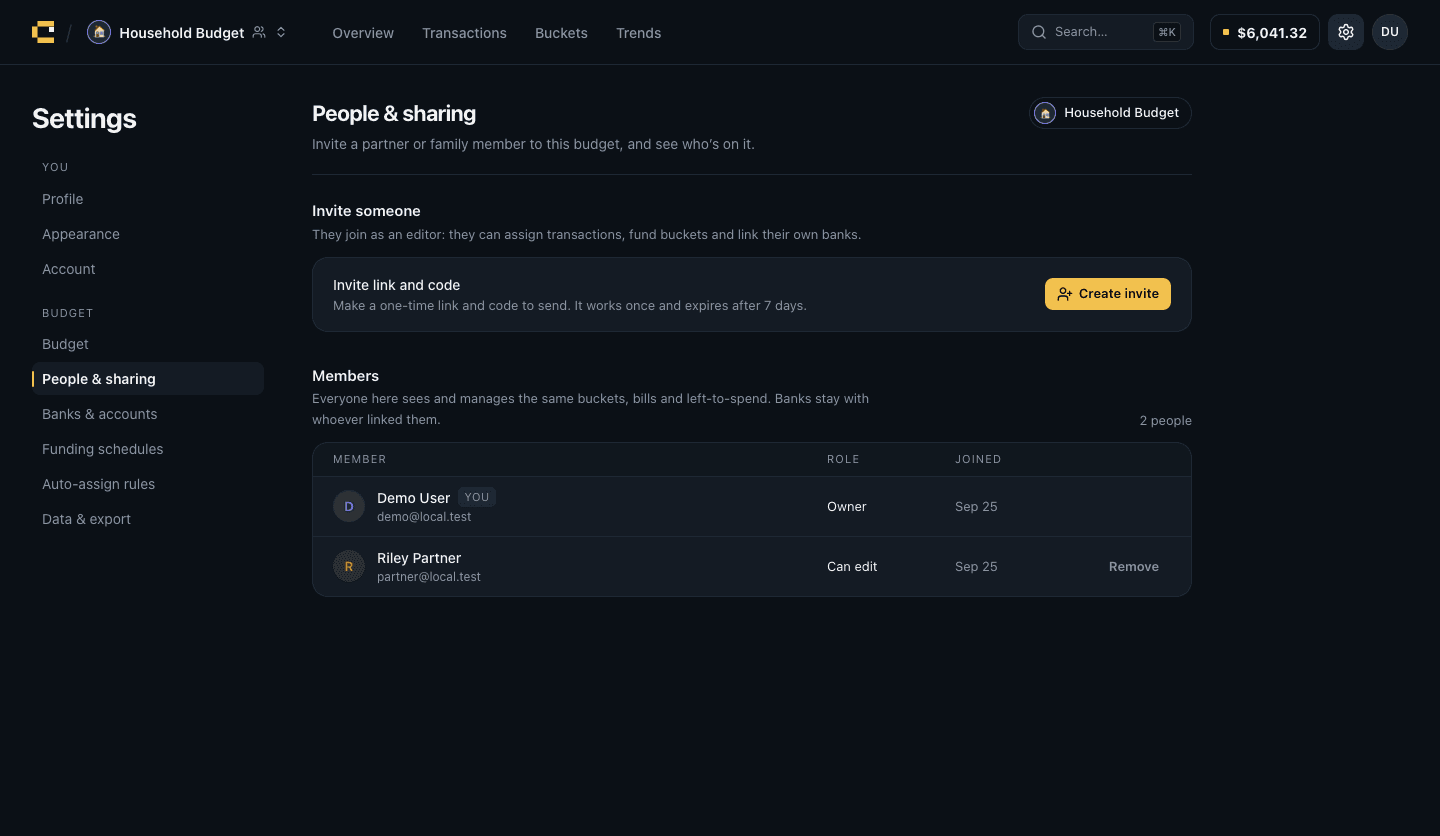
- NewShared budgets: invite a partner or family with a one-time code. Up to 8 people, each linking their own banks.
- NewFunding schedules can follow your paycheck and run the day the deposit lands, even if it's early.
- NewLeft-to-Spend widgets for the Home Screen and Lock Screen.
- ImprovedFaster, more reliable bank sync, with a clear prompt when a bank needs reconnecting.
- ImprovedA guided rule builder for auto-assign rules.
- ImprovedA rebuilt light mode that's easier to read.
- ImprovedBank credentials are handled entirely on our servers and never stored on your phone.
Everyday polish
A smoother app all round.
- ImprovedRefined settings, sheets and transaction details.
- FixedMany small layout and timing fixes across the app.
Envelope budgeting
The core of Copper: buckets, a live left-to-spend and money that moves on schedule.
- NewLeft-to-spend: cash minus everything set aside, updated as you spend.
- NewFunding schedules fill buckets automatically, on the server, even when the app is closed.
- NewAuto-assign rules and round-ups.
- NewA customizable Trends dashboard.
- NewEverything syncs across your devices.
Copper for iPhone
The first build of the iPhone app.
- NewLink banks, create buckets and see where your money goes.